
Understanding different user access levels in your account
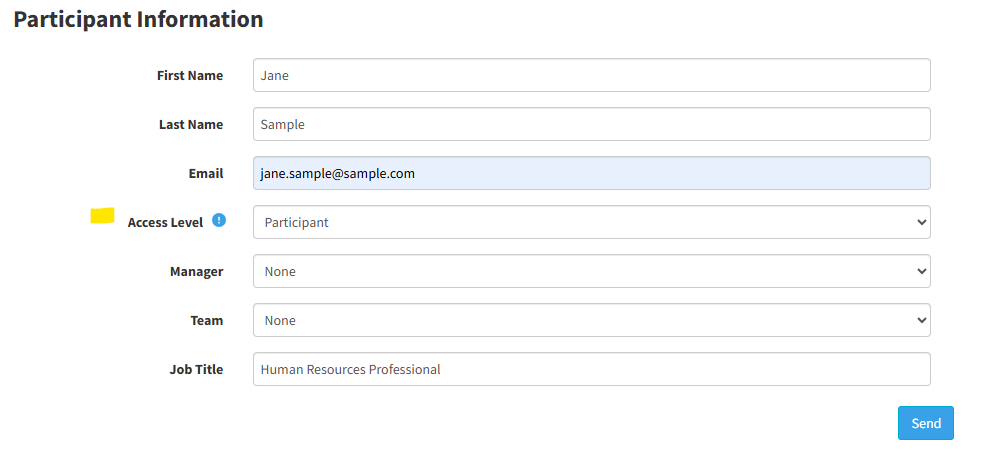
There are three primary Access Levels to choose from when creating users in your account.
- Participant: A user assigned to this level can be invited to complete a MAP assessment. A Participant can view their Summary and Personal Reports which are presented on the confirmation page after they complete their assessment. However, a Participant cannot log into the Account or otherwise access the profiles of other users.
- Employee: A user assigned to this level can log into the account but they can only access their own profile and Personal Report.
- Manager: A user assigned to this level can log into the Account but they can only access and view profiles of users to whom they are assigned as the Manager. A Manager must be created first in the Account, before they can be assigned as a Manager for another user.
- Account Manager: This is the highest-level. Any user assigned to this level can log into the Account and access and view all user profiles whether or not they are assigned as the user’s manager.
You can set a new user’s access level when using the Send a MAP feature.
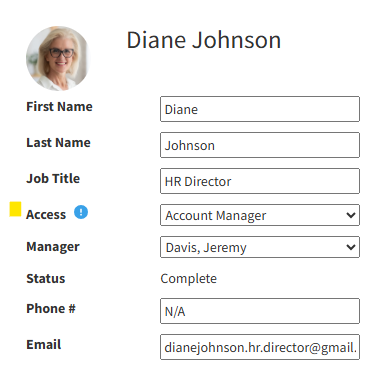
You can edit an existing user’s access level by opening their profile and clicking the Edit button.
Still need help? Contact support.
Online Support
Need help getting started? Trouble sending a MAP? Have a problem with your account? Our dedicated support team is here to help.
Call Us
Having trouble or have a question? Call us at 682-730-2033. Our support team is available 8am to 5pm CST, Monday through Friday.
Call Now

Call Us
Having trouble or have a question? Call us at 682-730-2033. Our support team is available 8am to 5pm CST, Monday through Friday.
Call Now